| 일 | 월 | 화 | 수 | 목 | 금 | 토 |
|---|---|---|---|---|---|---|
| 1 | 2 | 3 | 4 | 5 | 6 | |
| 7 | 8 | 9 | 10 | 11 | 12 | 13 |
| 14 | 15 | 16 | 17 | 18 | 19 | 20 |
| 21 | 22 | 23 | 24 | 25 | 26 | 27 |
| 28 | 29 | 30 |
- DART
- 휘발류
- VM
- 개발
- 템플릿
- virtualmachine
- 인프라
- 객체지향프로그래밍
- 주유소
- 오블완
- 티스토리챌린지
- 리눅스
- 개발기
- Flutter
- Bloc
- K&R
- 퇴근길
- 연습문제
- 에러
- ubuntu
- C언어
- 잡담
- 일상
- FreeBSD
- podman
- 가상머신
- VMware
- 오토바이
- Linux
- node.js
- Today
- Total
그냥저냥
[Scala] Java 24 환경에서 Scala 실행 시 sun.misc.Unsafe 경고 발생 해결 방법 (Scala 3.8 로드맵) 본문
[Scala] Java 24 환경에서 Scala 실행 시 sun.misc.Unsafe 경고 발생 해결 방법 (Scala 3.8 로드맵)
sync86 2025. 9. 13. 17:110. 들어가면서...
평온안 토요일 오후 "스칼라로 배우는 함수형 프로그래밍" 책을 펼쳤다. 컴퓨터 앞에 앉아 있다가 우연찮게 책장으로 시선이 갔고, 이 책이 눈에 들어왔다.
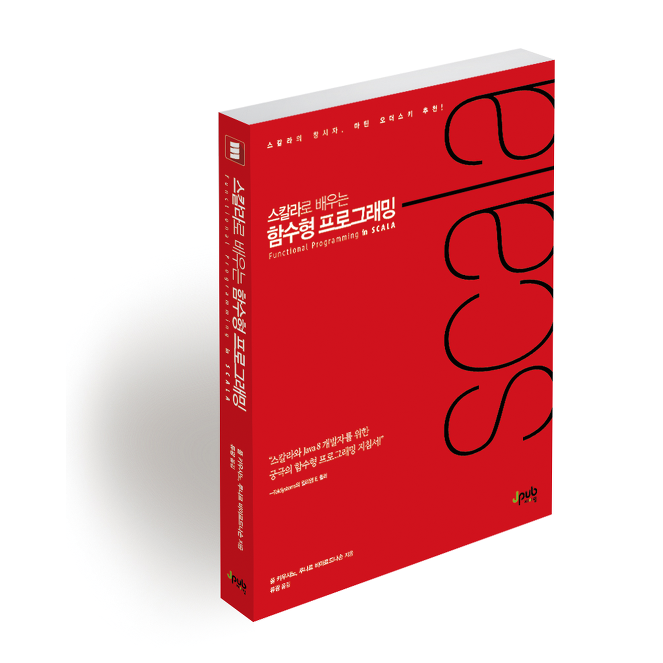
책 구매한 후 4장까지는 본 것 같은데 여기까지 보는 내내 어려워서 자연스레 책을 덮게 된 것 같다. 어찌 되었건 오늘 그 책을 다시 펴게 되었다.
이전에 HomeBrew로 설치한 Scala를 실행했더니 아래와 같은 현상을 보게 되었다. Scala를 이전에 설치한 이유는 오래 전 부터 책을 읽어야 겠다고 생각은 했는데 손이 안갔을 뿐이지 언젠가는 책을 다시 보겠다는 생각으로 설치한 것이다.
1. 어떤 현상인가?
HomeBrew로 scala를 설치한 후 실행을 했다. 그랬는데, 아래와 같이 WARNING 메시지가 보인다.
$ scala
WARNING: A terminally deprecated method in sun.misc.Unsafe has been called
WARNING: sun.misc.Unsafe::objectFieldOffset has been called by scala.runtime.LazyVals$ (file:/opt/homebrew/Cellar/scala/3.7.3/libexec/libexec/scala-cli.jar)
WARNING: Please consider reporting this to the maintainers of class scala.runtime.LazyVals$
WARNING: sun.misc.Unsafe::objectFieldOffset will be removed in a future release
WARNING: A terminally deprecated method in sun.misc.Unsafe has been called
WARNING: sun.misc.Unsafe::objectFieldOffset has been called by scala.runtime.LazyVals$ (file:/opt/homebrew/Cellar/scala/3.7.3/libexec/maven2/org/scala-lang/scala3-library_3/3.7.3/scala3-library_3-3.7.3.jar)
WARNING: Please consider reporting this to the maintainers of class scala.runtime.LazyVals$
WARNING: sun.misc.Unsafe::objectFieldOffset will be removed in a future release
Welcome to Scala 3.7.3 (24.0.2, Java OpenJDK 64-Bit Server VM).
Type in expressions for evaluation. Or try :help.

scala>
아마도 Java 기반의 언어이다 보니, Java 버전도 같이 확인했다.
$ java --version
openjdk 24.0.2 2025-07-15
OpenJDK Runtime Environment Homebrew (build 24.0.2)
OpenJDK 64-Bit Server VM Homebrew (build 24.0.2, mixed mode, sharing)
OpenJDK 버전 스펙이 24버전인데 아마도 Java 24에서 도입된 JEP 471(Deprecate the Memory-Access Methods in sun.misc.Unsafe for Removal) 때문이라고 추측된다.
2. 해결 방법은 (?)
$ # 환경 변수로 설정하는 방법 (zsh/bash)
$ export JAVA_OPTS="--sun-misc-unsafe-memory-access=allow"
$ scala
자바 어플리케이션(?)의 경우 위의 옵션을 명령줄에 포함하거나 JVM 옵션으로 설정하면 해당 WARNING 해결될 것 같다는 이야기는 보인다.
여기 어떤 분이 같은 이슈를 등록했고, Scala 관계자 분의 댓글을 보았다.
https://users.scala-lang.org/t/using-scala-3-6-4-with-java-24-gives-warnings/10700
Using Scala 3.6.4 with Java 24 gives warnings
❯ scala WARNING: A terminally deprecated method in sun.misc.Unsafe has been called WARNING: sun.misc.Unsafe::objectFieldOffset has been called by scala.runtime.LazyVals$ (file:/home/spam/.sdkman/candidates/scala/3.6.4/maven2/org/scala-lang/scala3-library
users.scala-lang.org
찾았다! Scala 관계자 분들이 이미 알고 있는 이슈였고, 2025년 Q4 Scala 3.8이 배포되면 이 이슈는 해결될 것 같다.
https://www.scala-lang.org/blog/next-scala-lts.html#immediate-motivation
Next Scala 3 LTS series will increase minimum required JDK version
Friday 31 January 2025 Tomasz Godzik, VirtusLab & Scala Core Team The Scala 3 Next minors in 2025 Q4 and the next LTS will drop JDK 8 support. We are seeking feedback on whether the new minimum JDK should be 11 or 17. This blog post is now superseded by a
www.scala-lang.org
3. 마무리
현재로서는 무해한 경고(Warning)이므로 무시하고 진행해도 무방할 것 같다. 하지만, 깔끔한 터미널을 원한다면 JVM 옵션을 사용하면 된다. 진정한 해결책인 Scala 3.8 LTS 버전은 2025년 4분기에 나올 예정이니 조금만 기다리면 될 것 같다.
2026년 03월 01일 (일) 추가 내용
위 내용에서 Scala 3.8 LTS 버전은 2025년 4분기에 해결될 것으로 언급하였다. 위 글을 작성한 뒤 시간이 꽤 지났다. 위 경고 메시지가 해결되었는지 다시 확인 봤으나, 아직 해결되진 않았다.
$ scala
WARNING: A terminally deprecated method in sun.misc.Unsafe has been called
WARNING: sun.misc.Unsafe::objectFieldOffset has been called by scala.runtime.LazyVals$ (file:/opt/homebrew/Cellar/scala/3.8.2/libexec/libexec/scala-cli.jar)
WARNING: Please consider reporting this to the maintainers of class scala.runtime.LazyVals$
WARNING: sun.misc.Unsafe::objectFieldOffset will be removed in a future release
WARNING: A restricted method in java.lang.System has been called
WARNING: java.lang.System::load has been called by com.sun.jna.Native in an unnamed module (file:/opt/homebrew/Cellar/scala/3.8.2/libexec/libexec/scala-cli.jar)
WARNING: Use --enable-native-access=ALL-UNNAMED to avoid a warning for callers in this module
WARNING: Restricted methods will be blocked in a future release unless native access is enabled

Welcome to Scala 3.8.2 (25.0.2, Java OpenJDK 64-Bit Server VM).
Type in expressions for evaluation. Or try :help.

scala>
OpenJDK 의 버전도 업데이트가 있었다. 참고로 설치된 환경은 25.0.2 2026-01-20 버전이다.
$ java --version
openjdk 25.0.2 2026-01-20
OpenJDK Runtime Environment Homebrew (build 25.0.2)
OpenJDK 64-Bit Server VM Homebrew (build 25.0.2, mixed mode, sharing)
새로운 메시지가 등장했는데, Java 25에서는 JEP 472(Prepare to Restrict Use of JNI and Native Code)가 강화되었다. com.sun.jna.Native가 네이티브 라이브러리를 로드하려고 할 때, 보안상 명시적 허용이 없으면 경고를 던진다. 물론 공부하고 있는 단계에서는 무시해도 되는 경고이지만, 콘솔 화면을 깔끔하게 유지하고 싶다면 새로운 버전에서는 아래의 명령어로 JVM 옵션을 지정해야 한다.
# 2026년 버전: Unsafe 허용과 Native Access 허용을 동시에!
export JAVA_OPTS="--sun-misc-unsafe-memory-access=allow --enable-native-access=ALL-UNNAMED"
환경 설정은 이쯤 하고, 이제 다시 4장의 함수형 미로 속으로 들어가겠습니다.
'개발기' 카테고리의 다른 글
| 회고 | 나의 임베디드 개발 경험 (0) | 2026.03.06 |
|---|---|
| Functional Programming in Scala 연습문제 2.1 (0) | 2025.10.12 |
| [Javascript] Truthy/Falsy 값 (0) | 2025.02.28 |
| SICP 노트 | 표현식 (2) (0) | 2025.02.26 |
| SICP 노트 | 표현식 (1) (0) | 2025.02.17 |

